ORDB Demo
This Jupyter notebook demonstrates the five main principles of ORDB, which is ORDeC’s data model layer. In addition, it briefly introduces ORDeC’s Cell-and-@generate pattern.
Principle 1: schema-based
All ORDB data must conform to some predefined schema. Usually, we would use the Node and SubgraphHead subclasses defined in Overview of ORDeC’s architecture (which are for IC design data), but for this example we will define a small example schema describing a planet with airports and flights that connect airports.
from ordec.core.ordb import *
class Planet(SubgraphRoot):
    diameter = Attr(float)

class Airport(Node):
    in_subgraphs = [Planet]

    label = Attr(str)
    year_opened = Attr(int)

class Flight(Node):
    in_subgraphs = [Planet]

    flight_code = Attr(str)
    duration = Attr(int)
    origin = LocalRef(Airport)
    destination = LocalRef(Airport)

    origin_idx = Index(origin) # will be discussed later
    destination_idx = Index(destination) # will be discussed later
We can now create a planet and add some airports and flights to it:
earth = Planet(diameter=1275.6)
earth.ber = Airport(label="Berlin Brandenburg Airport", year_opened=2012)
earth.cdg = Airport(label="Paris Charles de Gaulle Airport", year_opened=1974)
earth.lax = Airport(label="Los Angeles International Airport", year_opened=1928)
earth.nrt = Airport(label="Narita International Airport", year_opened=1978)
We added the airport nodes using the “.” oprator directly to earth. They can subsequently be accessed using the same operator. For example, we can figure out some attribute of the LAX airpot:
earth.lax.year_opened
1928
Note that earth.lax gives us a ORDB Cursor. The underlying database tuple (Node / row) is hidden in earth.lax.tuple.
earth.lax
Airport.Mutable(path=lax, nid=5, label='Los Angeles International Airport', year_opened=1928)
earth.lax.tuple
Airport.Tuple(label='Los Angeles International Airport', year_opened=1928)
Notice that a node ID (nid) was automatically assigned to each node/Airport. The node ID is unique to the subgraph (in this case, planet):
earth.ber.nid, earth.cdg.nid, earth.lax.nid, earth.nrt.nid
(1, 3, 5, 7)
We can also update attributes of nodes after insertion. This does not change their nid.
earth.ber.year_opened = 2020
earth.ber
Airport.Mutable(path=ber, nid=1, label='Berlin Brandenburg Airport', year_opened=2020)
Using the “%” modulo operator, we can add anonymous nodes to the database. These anonymous nodes cannot be accessed as a named child of “earth”, but the modulo operator returns Cursor references that we can save in variables. Let’s add a few flights as anonymous nodes:
abc123 = earth % Flight(flight_code="ABC123", origin=earth.ber, destination=earth.cdg, duration=60)
abc124 = earth % Flight(flight_code="ABC124", origin=earth.cdg, destination=earth.ber, duration=60)
earth % Flight(flight_code="XYZ50", origin=earth.cdg, destination=earth.nrt, duration=700)
earth % Flight(flight_code="XYZ51", origin=earth.nrt, destination=earth.cdg, duration=650)
earth % Flight(flight_code="XYZ60", origin=earth.nrt, destination=earth.lax, duration=510)
xyz90 = earth % Flight(flight_code="XYZ90", origin=earth.lax, destination=earth.cdg, duration=900)
We can retrieve data from the anonymous node Cursors and also follow their references (origin and destination) transparently:
print(f"Flight {xyz90.flight_code} goes from {xyz90.origin.label} to {xyz90.destination.label}.")
Flight XYZ90 goes from Los Angeles International Airport to Paris Charles de Gaulle Airport.
In the underlying database tuples, the origin and destination attributes are stored as nid references:
xyz90.tuple
Flight.Tuple(flight_code='XYZ90', duration=900, origin=5, destination=3)
Using the Subgraph.tables method, we can view our data in tabular form:
print(earth.tables())
Subgraph Planet.Mutable(0x7de8e0c9d6c0):
  Airport
  |   nid | label                             |   year_opened |
  |-------|-----------------------------------|---------------|
  |     1 | Berlin Brandenburg Airport        |          2020 |
  |     3 | Paris Charles de Gaulle Airport   |          1974 |
  |     5 | Los Angeles International Airport |          1928 |
  |     7 | Narita International Airport      |          1978 |
  Flight
  |   nid | flight_code   |   duration |   origin |   destination |
  |-------|---------------|------------|----------|---------------|
  |     9 | ABC123        |         60 |        1 |             3 |
  |    10 | ABC124        |         60 |        3 |             1 |
  |    11 | XYZ50         |        700 |        3 |             7 |
  |    12 | XYZ51         |        650 |        7 |             3 |
  |    13 | XYZ60         |        510 |        7 |             5 |
  |    14 | XYZ90         |        900 |        5 |             3 |
  NPath
  |   nid | parent   | name   |   ref |
  |-------|----------|--------|-------|
  |     2 |          | ber    |     1 |
  |     4 |          | cdg    |     3 |
  |     6 |          | lax    |     5 |
  |     8 |          | nrt    |     7 |
  Planet
  |   nid |   diameter |
  |-------|------------|
  |     0 |     1275.6 |
Furthermore, Subgraph.dump() exports the subgraph as Python expression, which we can use to reconstruct the subgraph:
print(earth.dump())
MutableSubgraph.load({
	0: Planet.Tuple(diameter=1275.6),
	1: Airport.Tuple(label='Berlin Brandenburg Airport', year_opened=2020),
	2: NPath.Tuple(parent=None, name='ber', ref=1),
	3: Airport.Tuple(label='Paris Charles de Gaulle Airport', year_opened=1974),
	4: NPath.Tuple(parent=None, name='cdg', ref=3),
	5: Airport.Tuple(label='Los Angeles International Airport', year_opened=1928),
	6: NPath.Tuple(parent=None, name='lax', ref=5),
	7: Airport.Tuple(label='Narita International Airport', year_opened=1978),
	8: NPath.Tuple(parent=None, name='nrt', ref=7),
	9: Flight.Tuple(flight_code='ABC123', duration=60, origin=1, destination=3),
	10: Flight.Tuple(flight_code='ABC124', duration=60, origin=3, destination=1),
	11: Flight.Tuple(flight_code='XYZ50', duration=700, origin=3, destination=7),
	12: Flight.Tuple(flight_code='XYZ51', duration=650, origin=7, destination=3),
	13: Flight.Tuple(flight_code='XYZ60', duration=510, origin=7, destination=5),
	14: Flight.Tuple(flight_code='XYZ90', duration=900, origin=5, destination=3),
})
In many cases, we want to iterate over all nodes of a specific type. This can be done using the method Subgraph.all():
for airport in earth.all(Airport):
    print(airport)
Airport.Mutable(path=ber, nid=1, label='Berlin Brandenburg Airport', year_opened=2020)
Airport.Mutable(path=cdg, nid=3, label='Paris Charles de Gaulle Airport', year_opened=1974)
Airport.Mutable(path=lax, nid=5, label='Los Angeles International Airport', year_opened=1928)
Airport.Mutable(path=nrt, nid=7, label='Narita International Airport', year_opened=1978)
Principle 2: Relational queries
Each airport can be the origin of multiple flights, but each flight originates at exactly one airport (1:n relation). While the ORDB cursor directly supports navigation from flight to its origin airport, the opposite direction is a bit more challenging, because the airport tuple does not store the nids of the flights originating there. For this type of query, an index is required. Fortunately, we have already defined indices for origin (origin_idx) and destination (destination_idx) in the schema definition of Flight above.
We can use these indices to query all flights originating at a particular airport:
for flight in earth.all(Flight.origin_idx.query(earth.cdg)):
    print(flight)
Flight.Mutable(nid=10, flight_code='ABC124', duration=60, origin=3, destination=1)
Flight.Mutable(nid=11, flight_code='XYZ50', duration=700, origin=3, destination=7)
Principle 3: Hierarchical tree organization
You might have already noted that our subgraph “earth” was automatically populated with some NPath nodes. These NPath nodes define a hierarchical tree structure for named nodes. When we added the airports, NPath nodes were added at the root of this tree (parent=None).
Using PathNode(), we can create arbitrary intermediate layers in this path tree. Let’s add some airports with hierarchical organization:
earth.united_kingdom = PathNode()
earth.united_kingdom.man = Airport(label="Manchester Airport", year_opened=1938)
x = earth.united_kingdom.man
print(x)
Airport.Mutable(path=united_kingdom.man, nid=16, label='Manchester Airport', year_opened=1938)
We can retrieve the full path from a cursor using the Cursor.full_path_str() method:
x.full_path_str()
'united_kingdom.man'
At the root of the tree, path segments mut be strings starting with a letter. Beyond the root, integers can also be used. In this context, the paths must be accessed using the item operator “[]” in Python:
earth.united_kingdom.london = PathNode()
earth.united_kingdom.london[0] = Airport(label="Heathrow Airport", year_opened=1929)
earth.united_kingdom.london[1] = Airport(label="London City Airport", year_opened=1987)
x = earth.united_kingdom.london[0]
print(x)
Airport.Mutable(path=united_kingdom.london[0], nid=19, label='Heathrow Airport', year_opened=1929)
Cursor.parent helps navigating the tree:
print(x.parent[1])
Airport.Mutable(path=united_kingdom.london[1], nid=21, label='London City Airport', year_opened=1987)
Note that the paths are primarily a naming convenience. The underlying nodes are still store in a flat structure. In the context on IC design, paths are useful for array and struct instances and for designs with hierarchical subunits.
Principle 4: Persistent data structure
So far, we wrote and read various nodes of our subgraph “earth”. Internally, the nodes are stored in a persistent map data structure (pyrsistent.PMap):
print(earth.subgraph.nodes)
pmap({16: Airport.Tuple(label='Manchester Airport', year_opened=1938), 0: Planet.Tuple(diameter=1275.6), 17: NPath.Tuple(parent=15, name='man', ref=16), 1: Airport.Tuple(label='Berlin Brandenburg Airport', year_opened=2020), 18: NPath.Tuple(parent=15, name='london', ref=None), 2: NPath.Tuple(parent=None, name='ber', ref=1), 19: Airport.Tuple(label='Heathrow Airport', year_opened=1929), 3: Airport.Tuple(label='Paris Charles de Gaulle Airport', year_opened=1974), 20: NPath.Tuple(parent=18, name=0, ref=19), 4: NPath.Tuple(parent=None, name='cdg', ref=3), 21: Airport.Tuple(label='London City Airport', year_opened=1987), 5: Airport.Tuple(label='Los Angeles International Airport', year_opened=1928), 22: NPath.Tuple(parent=18, name=1, ref=21), 6: NPath.Tuple(parent=None, name='lax', ref=5), 7: Airport.Tuple(label='Narita International Airport', year_opened=1978), 8: NPath.Tuple(parent=None, name='nrt', ref=7), 9: Flight.Tuple(flight_code='ABC123', duration=60, origin=1, destination=3), 10: Flight.Tuple(flight_code='ABC124', duration=60, origin=3, destination=1), 11: Flight.Tuple(flight_code='XYZ50', duration=700, origin=3, destination=7), 12: Flight.Tuple(flight_code='XYZ51', duration=650, origin=7, destination=3), 13: Flight.Tuple(flight_code='XYZ60', duration=510, origin=7, destination=5), 14: Flight.Tuple(flight_code='XYZ90', duration=900, origin=5, destination=3), 15: NPath.Tuple(parent=None, name='united_kingdom', ref=None)})
Persistent data structures are immutable and never need to be copied. Creating a copy of earth gives us a new Python object, but this new earth2 references the identical underlying PMap:
earth2 = earth.copy()
earth2.subgraph.nodes is earth.subgraph.nodes
True
Once we modify earth2, its “nodes” PMap in earth2 is replaced with an extended one.
earth2 % Flight(flight_code="ABC100", origin=earth.united_kingdom.man, destination=earth.cdg, duration=45)
earth2.subgraph.nodes is earth.subgraph.nodes
False
The new flight is part of earth2, but not of the original earth:
list(earth2.all(Flight.origin_idx.query(earth.united_kingdom.man)))
[Flight.Mutable(nid=23, flight_code='ABC100', duration=45, origin=16, destination=3)]
list(earth.all(Flight.origin_idx.query(earth.united_kingdom.man)))
One critical part of the persistent data structure PMap is that the insertion of the new flight into the nodes PMap created the new PMap earth2.nodes (1) without copying the entire previous earth.nodes and (2) while still preserving the immutability of earth.nodes.
Principle 5: Mutable and immutable interfaces
So far, the “earth” and “earth2” objects that we have operated on were MutableSubgraphs. If we pass a MutableSubgraph to a function, there is a danger that we accidentally modify it. This could lead to undesirable side effects outside the function!
def count_flights(planet):
    count = 0
    for flight in planet.all(Flight):
        count += 1
        flight.remove()
    return count
count_flights(earth2)
7
count_flights(earth2)
0
Whoops! We have accidentally deleted all flights from earth2, even though we only passed it as an argument to count_flights(). This is really undesirable behavior!
To prevent this, we can freeze subgraphs, which makes them immutable. Attempts to modify a FrozenSubgraph will lead to a TypeError:
earth_frozen = earth.freeze()
count_flights(earth_frozen)
Traceback (most recent call last):

  Cell In[28], line 1
    count_flights(earth_frozen)

  Cell In[24], line 5 in count_flights
    flight.remove()

  File ~/checkouts/readthedocs.org/user_builds/ordec/envs/v0.5.1/lib/python3.11/site-packages/ordec/core/ordb.py:891 in remove
    with self.subgraph.updater() as sgu:

  File ~/checkouts/readthedocs.org/user_builds/ordec/envs/v0.5.1/lib/python3.11/site-packages/ordec/core/ordb.py:1612 in updater
    raise TypeError("Unsupported operation on FrozenSubgraph.")

TypeError: Unsupported operation on FrozenSubgraph.
FrozenSubgraphs are conveniently used at function boundaries, preventing unintended side effects.
References between subgraphs
Another important part of ORDB are references between subgraphs. To explore this, let’s define a second type of subgraph for flight tickets:
class Ticket(SubgraphRoot):
    price = Attr(float)
    planet = SubgraphRef(Planet)

class TicketSegment(Node):
    in_subgraphs = [Ticket]

    flight = ExternalRef(Flight, of_subgraph=lambda c: c.root.planet)
    seat = Attr(str)

myticket = Ticket(price=1999.0, planet=earth_frozen)

f1 = [f for f in earth_frozen.all(Flight) if f.origin==earth_frozen.lax and f.destination==earth_frozen.cdg][0]
f2 = [f for f in earth_frozen.all(Flight) if f.origin==earth_frozen.cdg and f.destination==earth_frozen.ber][0]

myticket % TicketSegment(flight=f1, seat="15C")
myticket % TicketSegment(flight=f2, seat="39B")

print(myticket.tables())
Subgraph Ticket.Mutable(0x7de8c974c9c0):
  Ticket
  |   nid |   price | planet                        |
  |-------|---------|-------------------------------|
  |     0 |    1999 | Planet.Frozen(0x7de8c974f900) |
  TicketSegment
  |   nid |   flight | seat   |
  |-------|----------|--------|
  |     1 |       14 | 15C    |
  |     2 |       10 | 39B    |
Our cursors now also work beyond the boundaries of the “myticket” subgraph:
sum([segment.flight.duration for segment in myticket.all(TicketSegment)])
960
Note that subgraph references such as Ticket.planet must always point to FrozenSubgraphs. Here, a MutableSubgraph leads to a TypeError:
another_ticket = Ticket(price=1999.0, planet=earth)
Traceback (most recent call last):

  Cell In[31], line 1
    another_ticket = Ticket(price=1999.0, planet=earth)

  File ~/checkouts/readthedocs.org/user_builds/ordec/envs/v0.5.1/lib/python3.11/site-packages/ordec/core/ordb.py:1068 in __new__
    u.add_single(cls.Tuple(**kwargs), nid=0) # SubgraphRoots always have nid = 0

  File ~/checkouts/readthedocs.org/user_builds/ordec/envs/v0.5.1/lib/python3.11/site-packages/ordec/core/ordb.py:552 in __new__
    ret=super().__new__(cls, (ad.attr.factory(kwargs.pop(ad.name, None)) for ad in cls._layout))

  File ~/checkouts/readthedocs.org/user_builds/ordec/envs/v0.5.1/lib/python3.11/site-packages/ordec/core/ordb.py:552 in <genexpr>
    ret=super().__new__(cls, (ad.attr.factory(kwargs.pop(ad.name, None)) for ad in cls._layout))

  File ~/checkouts/readthedocs.org/user_builds/ordec/envs/v0.5.1/lib/python3.11/site-packages/ordec/core/ordb.py:276 in factory
    raise TypeError('MutableSubgraph cannot be assigned to SubgraphRef (must be frozen).')

TypeError: MutableSubgraph cannot be assigned to SubgraphRef (must be frozen).
Cell and @generate
ORDeC organizes IC design data in Cell subclasses. These Cell subclasses represent hardware units for which different ORDB subgraphs can be generated, e.g. a symbol, a schematic, a layout, and/or simulation results.
from ordec.core import *
from ordec.lib import Res, Gnd, Vdc

class VoltageDivider(Cell):
    @generate
    def schematic(self):
        print("INFO: Generating the schematic!")
        s = Schematic(cell=self, outline=Rect4R(0, 0, 4, 9))
        s.a = Net()
        s.b = Net()
        s.c = Net()

        s.R0 = SchemInstance(Res(r=R(100)).symbol.portmap(m=s.a, p=s.b), pos=Vec2R(0, 0))
        s.R1 = SchemInstance(Res(r=R(100)).symbol.portmap(m=s.b, p=s.c), pos=Vec2R(0, 5))

        return s
All Cell subclasses differ in an important way from regular Python classes: Instantiating them multiple times with identical parameters returns the same instance:
VoltageDivider() is VoltageDivider()
True
Methods using the @generate decorator as special “view generators”. They have no parameters beside “self” and are accessed like attributes/properties, without “()”. Their code is only executed on the first access.
print(repr(VoltageDivider().schematic))
INFO: Generating the schematic!
Schematic.Frozen(nid=0, symbol=None, outline=Rect4R(lx=R('0.'), ly=R('0.'), ux=R('4.'), uy=R('9.')), cell=VoltageDivider(), default_supply=None, default_ground=None)
The result is internally cached and returned on subsequent accesses:
print(repr(VoltageDivider().schematic))
Schematic.Frozen(nid=0, symbol=None, outline=Rect4R(lx=R('0.'), ly=R('0.'), ux=R('4.'), uy=R('9.')), cell=VoltageDivider(), default_supply=None, default_ground=None)
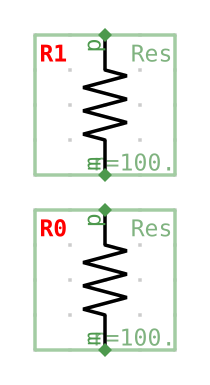
This (incomplete) schematic subgraph generated by VoltageDivider.schematic can also be rendered in Jupyter:
VoltageDivider().schematic
Cells can be parametrized:
from ordec.core import *
from ordec.lib import Res, Gnd, Vdc

class ParamVDiv(Cell):
    r = Parameter(R)
    @generate
    def schematic(self):
        print("INFO: Generating the schematic!")
        s = Schematic(cell=self, outline=Rect4R(0, 0, 4, 9))
        s.a = Net()
        s.b = Net()
        s.c = Net()

        s.R0 = SchemInstance(Res(r=self.r / 2).symbol.portmap(m=s.a, p=s.b), pos=Vec2R(0, 0))
        s.R1 = SchemInstance(Res(r=self.r / 2).symbol.portmap(m=s.b, p=s.c), pos=Vec2R(0, 5))

        return s
Whenever parameters differ, distinct Cells are generated:
ParamVDiv(r=R(200)) is not ParamVDiv(r=R(100))
True
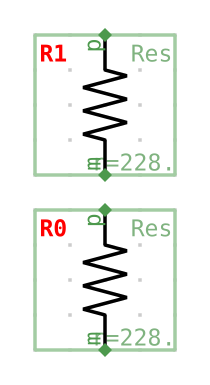
In the example above, the parameter “r” is used to calculate the resistance of both resistors of the ParamVDiv.schmatic. In the example below, setting the parameter to 456 leads to resistances of 228 Ω for both resistors:
ParamVDiv(r=R(456)).schematic
INFO: Generating the schematic!