ORD Language Tutorial
ORD (Open Rapid Design) is ORDeC’s hardware description language for IC design. It is designed to make custom IC design more software-like and text-based, as an alternative to traditional GUI-based tools. Follow this link for the full ORD language reference: ordec.ord — ORD language.
This tutorial provides a starting point for writing basic ORD code.
It covers all the main structures and features that ORD currently offers
and will be extended in the future as ORD gains more features. The inverter
will be the most referenced design throughout the tutorial, since it is
well-known and easy to get started with. All examples are written in ORD.
1. Cell
A cell is the root of an ORD file. It acts as the base of the design you
want to create. The name of the cell should describe the inner behavior of the design ordec.core.cell — Parametrizable cells and @generate.
%%ord
cell Inv:
    pass
2. Viewgen
Cell-specific generator functions described by the ORDeC data schema are defined using the viewgen keyword.
In ORD itself, symbol, schematic, and layout generators are supported directly.
Other view types can still be written as regular Python code when needed.
%%ord
cell Inv:
    viewgen symbol -> Symbol:
    	pass
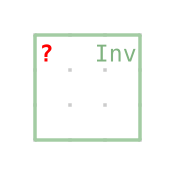
The view can be displayed with a simple function call. For a symbol, the resulting symbol gets displayed. However, you don’t need to worry about how to execute the ORD code yourself. Just use ORDeC’s built-in web interface Web UI!
Inv().symbol
3. Symbol
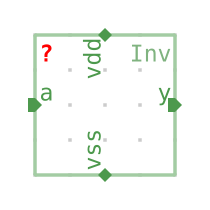
The symbol represents the outer connections of the cell when importing it into another top level
module. The keywords inout, input and output are used to set the direction of the Ports.
The alignment describes the orientation of the port in the symbol.
%%ord
cell Inv:
    viewgen symbol -> Symbol:
        inout vdd: .align=North
        inout vss: .align=South
        input a: .align=West
        output y: .align=East
4. Schematic
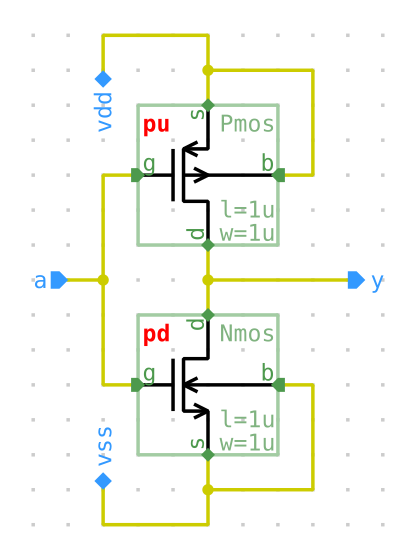
The schematic represents the inner behavior of the cell and how the ports of the symbol are wired. It supports multiple kinds of components that are explained in the following paragraphs.
%%ord
from ordec.lib.generic_mos import Nmos, Pmos

cell Inv:
    viewgen symbol -> Symbol:
        inout vdd: .align=North
        inout vss: .align=South
        input a: .align=West
        output y: .align=East

    viewgen schematic -> Schematic:
        port vdd: .pos=(2,13); .align=North
        port vss: .pos=(2,1); .align=South
        port y: .pos=(9,7); .align=West
        port a: .pos=(1,7); .align=East

        Nmos pd:
            .s -- vss
            .b -- vss
            .d -- y
            .pos = (3,2)
        Pmos pu:
            .s -- vdd
            .b -- vdd
            .d -- y
            .pos = (3,8)

        for instance in pu, pd:
            instance.g -- a
Inv().schematic
4.1 Relative access
You might have already recognized a specific feature of the ORD language called relative access
or dotted notation. Whenever an ORD-specific element is defined, a context is opened.
This context can be defined with the Python-style block based notation Nmos pd:.
Every statement or expression inside this context can reference the current context object by using a leading ..
# Oneline definition
port vdd: .pos=(2,13); .align=North
# Python-style block definition
port vdd:
    .pos=(2,13)
    .align=North
Attributes don’t have to be set directly on definition, they can also be set at a later point in the code
port vdd: .align=North
vdd.pos=(2,13)
4.2 Ports
Ports defined in the symbol must be placed in the schematic as well. This is done using the port keyword,
the name of the port vdd, and the attributes position and alignment.
4.3 Subcells
Subcells are the key components in the design of the schematic, they must be imported from the file
system using a normal Python-style import from ordec.lib.generic_mos import Nmos, Pmos. The imported
cells can be ORD- or Python-based. Referencing cells without the import is also possible, if the
other cell is defined in the same source file. Attributes of subcells are the port connections, the
parameters and the position in the schematic.
4.4 Connections
Connections between elements are another unique feature of the ORD language.
They use the -- pseudo-operator to connect an instance pin to a port or net.
The operator is commutative: inst.d -- vss and vss -- inst.d are equivalent.
4.5 Nets
In the case of the inverter, every instance inside the schematic is connected directly to a port.
However, other designs might require connections between subcells or branches. This logic can be implemented
using internal nets. The Nand is an example circuit where a net is needed to connect the two Nmos transistors.
%%ord
cell Nand:
    viewgen symbol -> Symbol:
        output y: .align=East
        input a: .align=West
        input b: .align=West
        inout vdd: .align=North
        inout vss: .align=South

    viewgen schematic -> Schematic:
        port y: .align=West; .pos=(25,6)
        port a: .align=East; .pos=(1,4)
        port b: .align=East; .pos=(1,17)
        port vdd: .align=East; .pos=(1,23)
        port vss: .align=East; .pos=(1,1)

        net net_conn

        Nmos n1: .pos=(10,2); .d -- net_conn; .s -- vss; .b -- vss; .g -- a
        Nmos n2: .pos=(10,10); .d -- y; .s -- net_conn; .b -- vss; .g -- b
        Pmos p1: .pos=(5,18); .d -- y; .s -- vdd; .b -- vdd; .g -- a
        Pmos p2: .pos=(15,18); .d -- y; .s -- vdd; .b -- vdd; .g -- b

4.6 Paths
ORDeC uses hierarchical subgraphs to add elements to a view.
When defining elements in a symbol, schematic, or layout, they become children of the current subgraph.
Further nesting of elements can be achieved using path elements. Paths open a new subgraph
layer where elements can be added using indices.
This enables definition of list-like elements, which are especially powerful in
combination with the parametrization feature of ORDeC.
path bit
path bit[i]
See 4.7 Parametrization for a concrete example using paths.
4.7 Parametrization
Cells can be parametrized to make them reusable and adjust to new applications. This enables customizable cells like, in this case, a register with a variable number of bits.
%%ord
cell MultibitReg_ArrayOfStructs:
    bits = Parameter(int)
    viewgen symbol -> Symbol:
        input vdd: .align=North
        input vss: .align=South
        path bit
        for i in range(self.bits):
            path bit[i]
            input bit[i].d: .align=West
            output bit[i].q: .align=East
        input clk: .align=West
Parameters for subcells are set using the dollar $ operator.
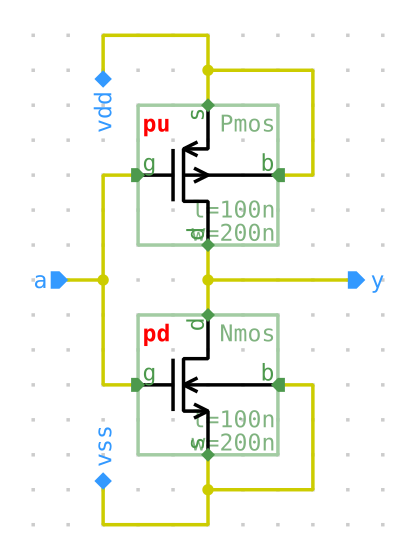
In this example, we set the length of the transistors l to 100n and the width w to 200n.
ORD supports all common SI suffixes for cell parameters that use the Rational class type ordec.core.rational — Rational numbers.
(a=atto, f=femto, n=nano, u=micro, m=milli, k=kilo, M=Mega, G=Giga, T=Tera)
%%ord
cell Inv:
    viewgen symbol -> Symbol:
        inout vdd: .align=North
        inout vss: .align=South
        input a: .align=West
        output y: .align=East

    viewgen schematic -> Schematic:
        port vdd: .pos=(2,13); .align=North
        port vss: .pos=(2,1); .align=South
        port y : .pos=(9,7); .align=West
        port a : .pos=(1,7); .align=East

        Nmos pd:
            .s -- vss
            .b -- vss
            .d -- y
            .pos = (3,2)
            .$l = 100n
            .$w = 200n
        Pmos pu:
            .s -- vdd
            .b -- vdd
            .d -- y
            .pos = (3,8)
            .$l = 100n
            .$w = 200n

        for instance in pu, pd:
            instance.g -- a
4.8 Anonymous nodes
Sometimes a node is only a temporary helper and should not get a persistent path name.
This is especially common inside loops, where repeating the same node name would otherwise
create path conflicts. The anonymous keyword creates the node normally, assigns it to a local
variable, but skips registration in the ORDB path system.
Typical usage looks like this: anonymous LayoutRect r: creates a temporary rectangle, and
a constraint such as ! .contains(sd.rect) can still be applied to it locally.
The variable r can still be used inside the current block, but there is no .r child on the
parent view.
See 5. Layout for a runnable example using anonymous.
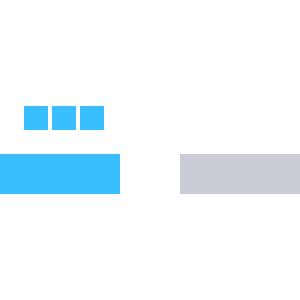
5. Layout
ORD layout generators use the same context-based syntax as symbols and schematics.
In practice, a layout view usually starts by selecting a layer stack, then creating
geometry such as LayoutRect, LayoutPath, or LayoutPin, and finally constraining
the geometry with ! expressions.
%%ord
from ordec.lib.ihp130 import SG13G2

cell LayoutDemo:
    viewgen symbol -> Symbol:
        input a: .align=West
        output y: .align=East

    viewgen layout -> Layout:
        .ref_layers = SG13G2().layers
        layers = .ref_layers

        LayoutRect in_bar:
            .layer = layers.Metal1
            ! .lx == 0
            ! .ly == 0
            ! .width == 600
            ! .height == 200
            . % LayoutPin(pin=self.symbol.a)

        LayoutRect out_bar:
            .layer = layers.Metal2
            ! .lx == in_bar.ux + 300
            ! .ly == in_bar.ly
            ! .width == 600
            ! .height == 200
            . % LayoutPin(pin=self.symbol.y)

        for i in range(3):
            anonymous LayoutRect stub:
                .layer = layers.Metal1
                ! .width == 120
                ! .height == 120
                ! .lx == in_bar.lx + 120 + 140 * i
                ! .ly == in_bar.uy + 120
5.1 Constraints
The ! prefix adds a constraint instead of executing a normal statement.
This is particularly useful in layouts, where relative geometry is often more
natural than assigning absolute coordinates everywhere.
Common patterns are ! out_bar.lx == in_bar.ux + 300, ! .contains(other.rect),
and ! .width == 600.
This style scales well to larger generators. The vco_pseudodiff.ord example uses
the same mechanism to align devices, pin bars, and routing anchors across a much larger layout.
5.2 Layout pins and advanced helpers
LayoutPin attaches layout geometry back to a symbol pin, so the layout keeps a semantic
connection to the cell interface.
More advanced layout generators can also mix ORD syntax with Python helper APIs. For example,
ordec.examples.vco_pseudodiff uses helpers such as SRouter and makevias, then attaches
the generated routing back to a symbol pin with sr.path % LayoutPin(pin=self.symbol.rst_n).
This combination of ORD syntax and Python helpers is one of the strengths of ORD: concise textual geometry where it is helpful, and direct access to Python building blocks when a generator becomes more algorithmic.
6. Python support
ORD is not a standalone language. It is a language extension (superset) of Python! ORD is capable of running and including any Python code, which has the advantage that Python functionalities can be used directly inside ORD. Furthermore, ORDeC features that are not yet implemented in ORD itself can be written as Python components inside an ORD file :) But it is not a problem if you are not used to Python. ORD as described here doesn’t require understanding complex Python language features, but some knowledge definitely helps getting started!
%%ord
def add(x, y):
	return x + y

cell Inv:
    viewgen symbol -> Symbol:
        inout vdd: .align=North
        inout vss: .align=South
        input a: .align=West
        output y: .align=East
        print(f"Result: {add(1, 2)}")
Result: 3
7. Import ORD
Every module written in ORD can be imported like a Python module through the ORD importer!
# Get the ORDeC importer
import ordec.importer
# Import your ORD file!
from ordec.examples.nand2 import Nand2
I hope this short tutorial gave you some insights into how to get started
writing ORD code! Feel free to check out the ORD examples in ordec.examples
by importing and adjusting them in the web interface.
Happy ORD coding!